
Intro
The Parsempo Anonymous Audience Analytics solution can be used with any image sensor that generates a continuous video stream. A USB webcam is usually the most straightforward and cost-effective option. However, in certain situations, IP cameras may be more suitable.
This guide will outline the best practices for connecting and setting up Cameras and image sensors for Anonymous Audience Analytics.
Requirements
Built-in Image sensors and cameras
Built-in Image sensors and cameras (e.h. front-facing cameras on a phone, tablet, or OEM display) make it easy to activate Anonymous Audience Analytics without connecting external peripherals and handling placement and cable management.
| Requirement | Minimum | Recommended | Notes |
| Resolution | 1 MP (720P) | 2 MP + (1080P+) | For close detection (inside mobility), 720P is good enough. Higher resolution will use more CPU and RAM. |
External Cameras
The Parsempo Anonymous Audience Analytics solution works with webcams that adhere to the UVC standard (a video device standard that makes a camera recognizable by most operating systems) and can be connected to USB 2.0 or 3.0 ports.
Here are some things to take into account when picking a USB webcam:
| Requirement | Minimum | Recommended | Notes |
| Resolution | 720P | 720P-1080P | The majority of webcams have a resolution of 1920 x 1080 (2 megapixels), which is the standard. With a standard lens, these webcams are capable of detecting faces at a distance of around 3-5.5 meters. However, cameras with lower resolution may not perform as well when it comes to face detection at a distance. This trade-off may be acceptable in scenarios where the audience won’t be far away, and the lower resolution will result in a lighter load on the computer’s CPU. |
| Focus | Automatic | Manual | Many webcams are equipped with automatic autofocus that adjusts the focus as a person moves closer to the camera. This feature is not required for Anonymous Audience Measurement, and while it won’t cause any issues, it’s important to note that any moving part in a device may eventually wear out. If a fixed focus is preferred, webcams with screw-on lenses are the best option to ensure the focus remains unchanged. |
| Minimum FPS | 15fps | 30fps | |
| Recommended viewing angle | 60° FOV | 75°-120° FOV | Typically, consumer webcams come with a horizontal field of view between 60-80°, which is ideal in situations where there’s no nearby activity. However, if the focus of the camera needs to be seen from the sides, such as in a retail aisle or to monitor a store window, a field of view closer to 120° might be a better option. Webcams with a field of view beyond 100° are uncommon in consumer products, in which case you may want to consider webcams with interchangeable lenses. These lenses are specified in millimeters of focal length, and the smaller the value, the wider the field of view (considering sensor size and lens coverage). For instance, a 1.4mm lens will provide a 140° horizontal field of view on most webcams, while a 3.6mm lens will offer 60°. Please keep in mind that a wider field of view will result in a shorter detection distance. |
| Sensitivity | at least 4.0V/(lux • s) | at least 4.0V/(lux • s) | |
| Sharpness | at least 1000LW/PH | at least 1000LW/PH | |
| Built-in encoding | h.264 | h.264 | Cameras that don’t have built-in encoding use more processing power |
| Connecting via | USB | USB | Must use USB port (external or component level) |
| USB Extension | Active USB | Active USB | Most webcams come with cords that range from 0.8 to 2 meters in length. If you require a longer cord, make sure to use a powered USB extension cord. |
External Camera positioning
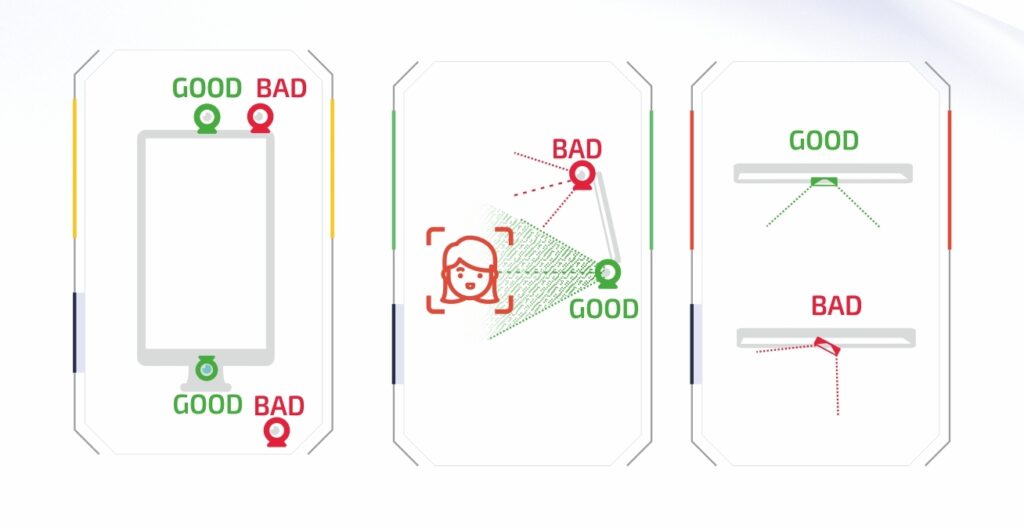
Please consider the following guidelines while mounting cameras:
- Opt for an indoor location with soft, consistent lighting.
- Mount the cameras at a level close to the eyes, if feasible.
- Center the camera over the main subject of focus. E.g., if mounting on a screen, place it in the center of the top edge. If the top of the screen is much higher than eye level, place the camera on the bottom edge.
- Direct the camera towards the primary flow of traffic.
- Ensure secure placement, and use double-sided tape if required.
- Avoid the following when mounting:
• Light sources that may cause picture distortion.
• Hard lighting shining directly on the camera, as it can cast shadows and affect detection quality.
• Dark indoor areas.
• Any elements causing visual irregularities (such as a window’s glare). If counting storefront views, place the camera directly in front of the store.”
Recommended USB image sensors and Webcams
Image sensors
ELP – OEM/ODM manufacturer
Consumer-grade USB webcams
| 1080P | Logitech C920 | Logitech С920; |
| Logitech C922 | Logitech C922 Pro Stream | |
| Foscam w25 | https://www.foscammall.com/products/w25-1080p-webcam | |
| 720P | Logitech c270 | https://www.logitech.com/en-us/products/webcams/c270-hd-webcam.960-000694.html |
| Logitech c310 | https://www.logitech.com/en-us/products/webcams/c310-hd-webcam.960-000585.html |